For months, the bottom of my Claude Code window said something like 🤖 Opus 5.5 | 📁 blog | 🌿 main | 💵 $1.284. Eighteen lines of bash printed it, and it did its job. Then I wanted it to tell me more: how full the context window was, how much of my plan’s five-hour and weekly limits I’d used, and to turn amber, then red, before any of them ran out. So, with Claude Code’s help, I rebuilt it as a mod: a few files of TypeScript that run inside Claude Code and draw with its own parts.
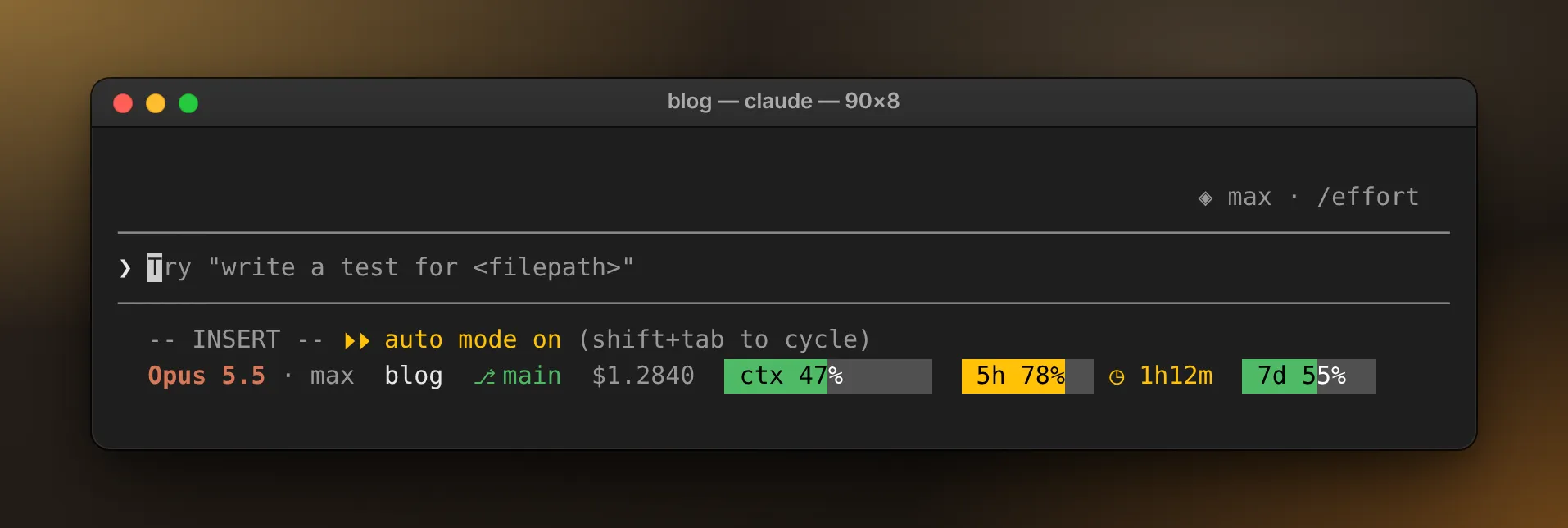
From the left: the model and its effort level, the folder, the git branch, the session’s cost so far, then gauges for the context window, the five-hour limit and the weekly limit. Each gauge is a bar with its label inside, filled in proportion and coloured by how close it is to full. The five-hour one has gone amber, so it also says when it resets.
Below: how the old line worked, why I moved it, what a mod is, a small one you can build in three files, what mine adds, and what tripped me up. To go straight to building, skip to a status line mod in three files.
How the old one worked
Claude Code has a setting for this. Point statusLine in ~/.claude/settings.json at a command, and Claude Code runs it whenever something changes: when Claude sends a message, when /compact finishes, when the permission mode changes, and a few more, plus on a timer if you set refreshInterval. Each run gets a JSON description of the session on standard input (the stream a | pipe feeds into a program), and whatever the command prints shows up at the bottom of the screen. Claude Code waits for 300 milliseconds of quiet before it runs the command, so a burst of changes runs it once.
This was mine:
#!/bin/bash
input=$(cat)

# Extract values from JSON input
MODEL=$(echo "$input" | jq -r '.model.display_name')
DIR=$(echo "$input" | jq -r '.workspace.current_dir' | xargs basename)
COST=$(echo "$input" | jq -r '.cost.total_cost_usd')

# Get git branch if in a git repo
GIT_BRANCH=""
if git rev-parse --git-dir > /dev/null 2>&1; then
    BRANCH=$(git branch --show-current 2>/dev/null)
    if [ -n "$BRANCH" ]; then
        GIT_BRANCH=" | 🌿 $BRANCH"
    fi
fi

echo "🤖 $MODEL | 📁 $DIR$GIT_BRANCH | 💵 \$$COST"
And the setting that ran it:
{
  "statusLine": {
    "type": "command",
    "command": "input=$(cat); cwd=$(echo \"$input\" | jq -r '.workspace.current_dir'); cd \"$cwd\" 2>/dev/null && echo \"$input\" | bash ~/.claude/statusline.sh"
  }
}
input=$(cat) reads the whole JSON into a variable. Three jq calls (jq is a small command-line JSON reader) pick out the model’s display name, the folder and the cost, and two git calls find the branch. The command in the setting cds into the session’s folder before it runs the script, so git looks at the right repository.
It’s a good design. Any language that reads standard input will do, and the JSON carries far more than I used: the context window’s used_percentage, both plan limits under rate_limits, even the current effort level. Everything I wanted to show was already in there.
So why a mod?
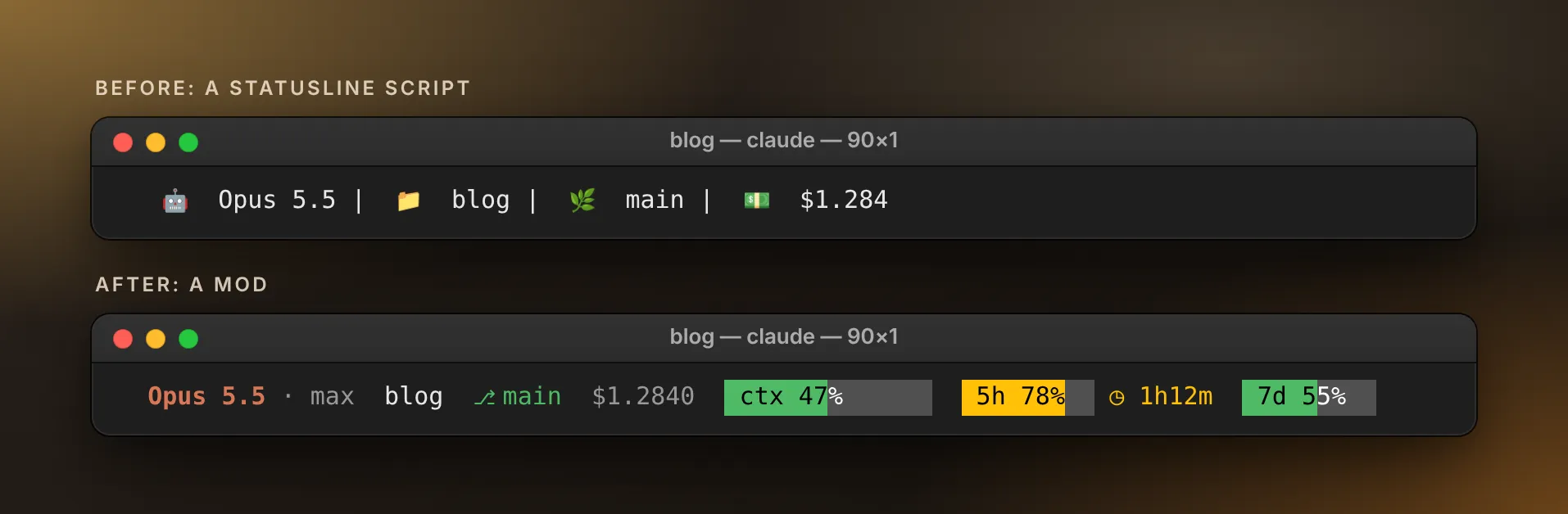
Not for the data. For the way the line looks, where it sits and how it’s built.
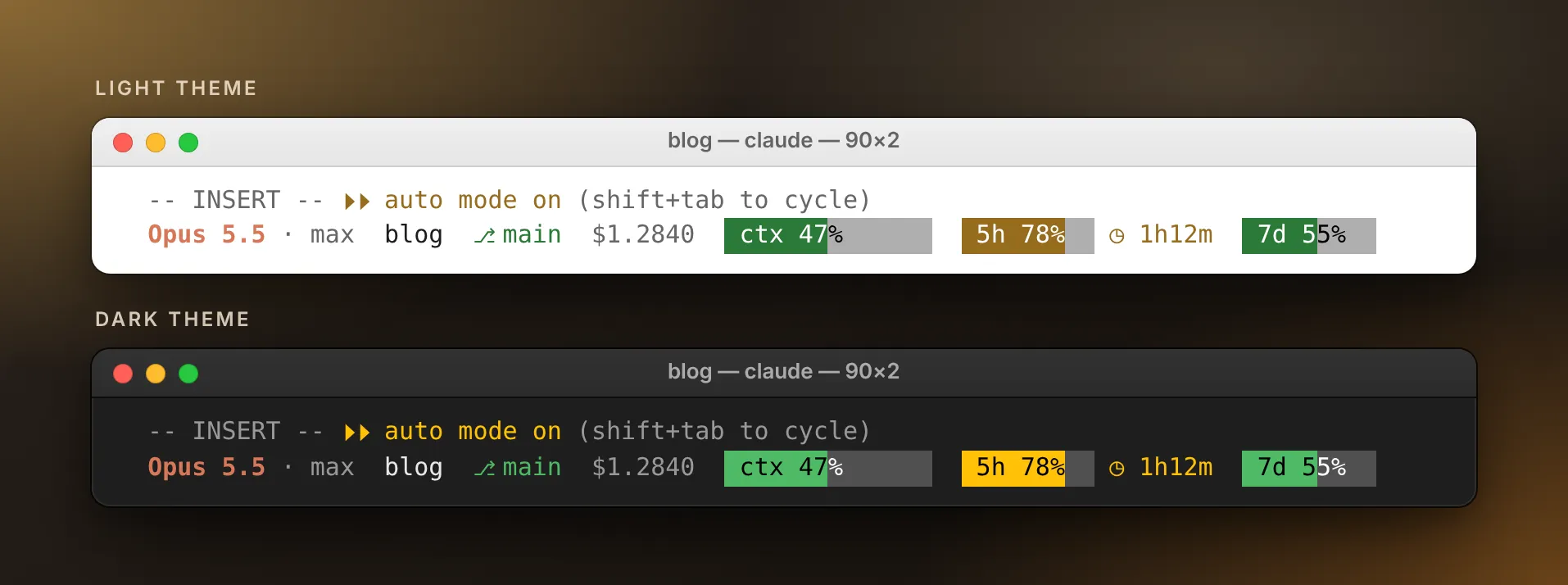
Colours that follow the theme. A script colours text with ANSI escape codes, fixed colours that know nothing about Claude Code’s theme, and mine runs with "theme": "auto", which switches between light and dark. A mod colours with theme keys such as success, warning, error and subtle, which Claude Code maps to a colour in each theme.
Claude Code’s hints stay. With a statusLine set, Claude Code gives its output a row of its own and stops showing most of the footer’s keyboard hints, such as esc to interrupt and ? for shortcuts. A mod can draw in the hint line itself, keep Claude Code’s own drawing of it, and add a row under it.
No processes to start. Each refresh of the old line launched about a dozen programs: bash and cat twice each, jq four times, git twice, then xargs and basename. A mod reads the same figures from inside Claude Code and starts nothing but a single git call per refresh.
Tests that cover time. A script can be tested by piping sample JSON into it. That covers the formatting but not time: what the line shows straight after /clear, or while git hangs. Mods have a test runner with a fake clock and stand-ins for everything Claude Code would answer.
The script still wins in places. It’s simpler, it can be any language, its JSON has the live effort level (a mod has to work that out, as you’ll see), and the statusLine setting is settled while the mods API still changes between releases. Side by side:
statusLine script |
Mod | |
|---|---|---|
| Runs | A new process for each update | Inside Claude Code |
| Written in | Any language | TypeScript or JavaScript |
| Gets data from | A JSON snapshot on standard input | Events, and calls to the mods API |
| Draws | Text, ANSI colours and links | Claude Code’s own elements, in its theme colours |
| Keyboard hints | Mostly hidden | Kept |
| Tested with | Sample JSON piped in | claude plugin test |
What a mod is
A mod is a plugin whose code runs inside Claude Code. You write functions, called hooks, and register each one for an event: a tool call, a submitted prompt, a turn ending, a part of the screen being drawn. When the event happens, Claude Code calls your function, and the function can watch the event, change it, or handle it itself. If you’ve used the hooks in settings.json, which run a shell command when an event happens, it’s the same idea, except a mod’s hooks are functions running inside Claude Code.
Think of a car. A status line script is a passenger with a notepad. Every so often Claude Code hands them a printout from the trip computer, they write one line, and Claude Code tapes it to the dashboard. A mod is a gauge wired into the dashboard: connected to the engine, moving when the engine does, and lit like everything around it.
Every hook has the same shape:
import type { Register } from "claude-code"

export const register: Register = (on) => {
  on("session.measure", ($, e, next) => {
    // $ is the mods API, e is the event, next passes the event on
    return next(e)
  })
}
If you’ve written Express or Koa middleware, next will look familiar. Call it, and the event carries on to the hooks after yours and then to Claude Code itself. Don’t, and you’ve answered the event yourself.
Everything a mod does beyond its own code goes through $: reading the session, drawing, running a program, setting a timer. A mod has no setTimeout, no file system and no child_process of its own. That’s deliberate. Because every capability goes through $, claude plugin validate can read a mod’s source and list everything it touches before you run it. That list matters: a mod runs with your permissions and isn’t sandboxed, so it can read and write your files, start programs and reach the network. Treat one like any other code you run.
A status line mod in three files
The smallest useful version shows the model and how full the context window is, under the hint row. It takes a folder and three files:
~/.claude/mods/my-statusline/
├── .claude-plugin/
│   └── plugin.json
└── hooks/
    ├── hooks.json
    └── register.tsx
plugin.json names the plugin:
{
  "name": "my-statusline",
  "version": "0.1.0",
  "description": "A status line under the prompt",
  "author": { "name": "Your Name" }
}
hooks.json points at the code:
{ "modules": ["./register.tsx"] }And register.tsx is the mod:
import type { EngineInterface, Register } from "claude-code"

// What the line says. Module variables start over on every reload.
let line = ""

async function refresh($: EngineInterface): Promise<void> {
  const [model, usage] = await Promise.all([
    $.session.model(),
    $.session.usage(),
  ])
  const percent = usage.context.percent
  const context = percent === undefined ? "--" : `${Math.round(percent)}%`

  line = `${model}  ctx ${context}`
  $.ui.invalidate("ui.render")
}

export const register: Register = (on) => {
  // Before the first prompt, and again each time the mod reloads.
  on("session.start", ($, e, next) => {
    void refresh($)
    return next(e)
  })

  // After every turn, and whenever a plan limit moves.
  on("session.measure", ($, e, next) => {
    void refresh($)
    return next(e)
  })

  // The hint line under the prompt: Claude Code's own row, plus ours.
  on("ui.render", { component: "PromptHint" }, async ($, e, next) => {
    const hintRow = await next(e)
    if (e.surface !== "terminal" || line === "") return hintRow

    const { Box, Text } = $.ui.resolve(e)
    return (
      <Box flexDirection="column">
        <Text color="claude" wrap="truncate">
          {line}
        </Text>
        {hintRow}
      </Box>
    )
  })
}
In plain English, piece by piece:
refresh asks Claude Code for the model and the usage figures, builds the text, and asks for a redraw. $.session.usage() returns the same figures a status line script gets in its JSON, and called without arguments it costs nothing. context.percent is missing until Claude’s first reply, hence the --.
session.start and session.measure start a refresh: before your first prompt (and after every reload), then after each turn and whenever a plan limit moves. void refresh($) doesn’t wait for it to finish: a hook’s own code gets ten seconds before Claude Code skips it, and no status line is worth holding a session up for.
ui.render on PromptHint does the drawing. Claude Code’s screen is made of render sites, named places a mod can draw in or redraw: panes, the band above the prompt, the spinner, messages. PromptHint is the dim hint line under the prompt. await next(e) returns Claude Code’s own drawing of that line as a reference, { type: 'engine', ref }, and the hook returns a column holding its text and that reference.
Here’s the surprise: on screen, the order comes out the other way round. The terminal draws its live hint row above anything a mod draws at this site, and the reference inside your tree draws as nothing. Leave the reference out, though, and the hint row goes with it. So the text that comes first in the tree lands under the hint row, and the reference you carry is what keeps the hints alive.
e.surface is terminal or desktop, because the Code tab of the Claude desktop app has this site too. This mod leaves the desktop’s footer alone. Mods draw in those two places only: the VS Code extension’s chat panel and claude -p run a mod’s hooks but show nothing it draws.
To try it, start a session with the folder:
claude --plugin-dir ~/.claude/mods/my-statuslineClaude Code watches the folder and reloads the mod each time you save, leaving a dim line in the transcript that names the mod and its hooks. If a save breaks the module, that line says reload failed, the previous version stays loaded, and the last working version keeps running. A drawing that doesn’t validate is refused the same way: Claude Code draws its own hint line and says why.
To have the mod in every session, add its folder to the env block of ~/.claude/settings.json:
{
  "env": {
    "CLAUDE_CODE_PLUGIN_DIRS": "~/.claude/mods/my-statusline"
  }
}
The ~ works on every OS. More folders go in the same string, separated by :, or ; on Windows. Sessions that load a mod this way also reload it when its files change, so a git pull in the mod’s folder updates sessions that are already open. Mods are plugins, so one can also be shared through a plugin marketplace and installed with /plugin install; for a mod of your own, a folder is simpler. Mods need Claude Code 2.1.287 or later.
Before you start a session, check the mod:
claude plugin validate ~/.claude/mods/my-statusline> ./register.tsx hooks: session.start, session.measure, ui.render{component=PromptHint}
> ./register.tsx calls: $.session.model (via refresh), $.session.usage (via refresh), $.ui.invalidate (via refresh), $.ui.resolve
√ Validation passedThose hooks: and calls: lines are the list of what the mod touches, and they’re worth reading on any mod before you install it.
You don’t have to type any of this yourself. Describe the line you want in a Claude Code session and ask for a mod: Claude Code has a skill for writing them, checks its work with claude plugin validate, and can reload the mod as it goes. Mine came out of a conversation like that.
What mine adds
The starter is the skeleton. Mine is about 500 lines across three source files and adds gauges, colour levels, a layout that fits any width, and care about timing.
Gauges that are their own labels
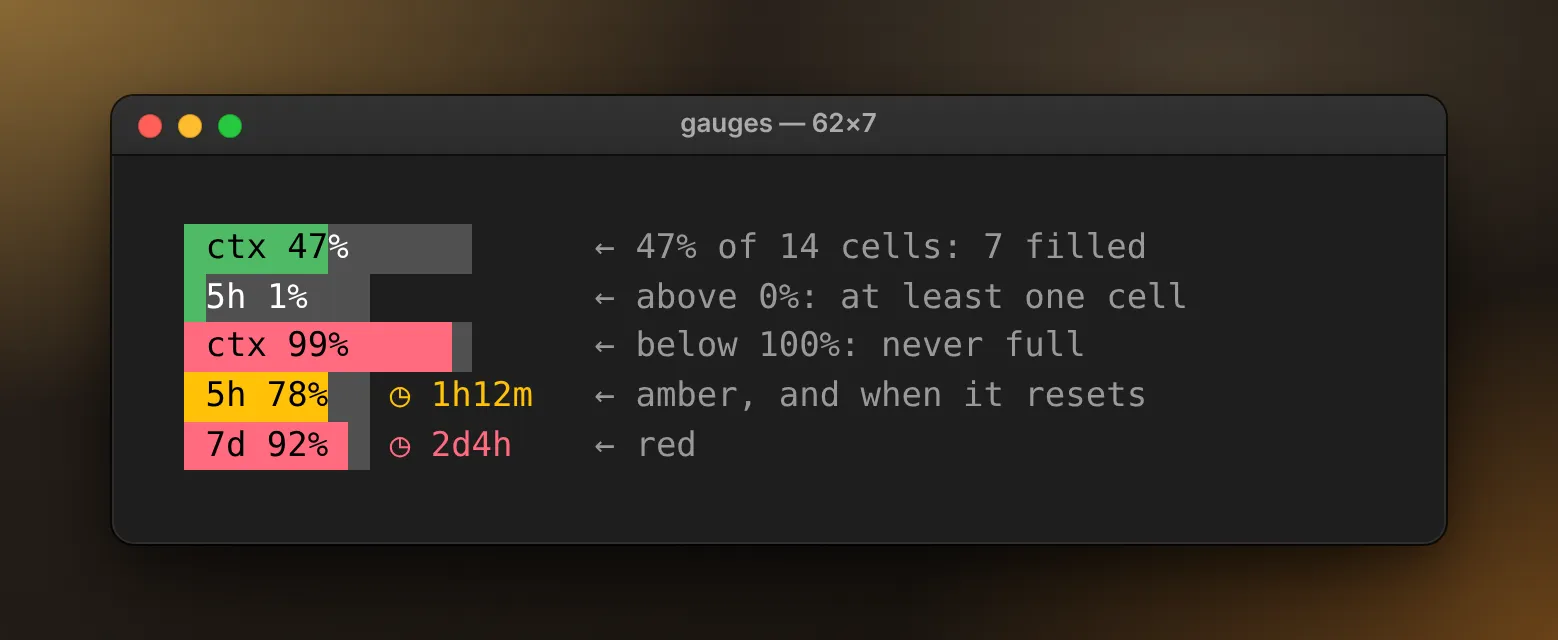
A gauge is a fixed run of cells with its label inside. The context gauge is 14 cells wide, so ctx 47% gets a space in front and enough after it to fill all 14. The mod cuts that label in two at the fill point. The first part gets the level’s colour as its background, with the theme’s inverse text colour on top, and the rest sits on the theme’s subtle track:
const cells = [...label] // ' ctx 47%      ', one character per cell
const head = cells.slice(0, filled).join("")
const tail = cells.slice(filled).join("")

return [
  <Text backgroundColor={level} color="inverseText">
    {head}
  </Text>,
  <Text backgroundColor="subtle" color="text">
    {tail}
  </Text>,
]
The fill rounds to the nearest cell, with two exceptions: anything above 0% fills at least one cell, and anything below 100% leaves at least one empty. You can tell “a little” from “nothing”, and a full bar always means full.
Thresholds in one file
The levels live in a file of their own, so changing when a gauge turns amber or red never means touching the drawing code:
const THRESHOLDS = {
  ctx: { warning: 60, error: 80 },
  "5h": { warning: 75, error: 90 },
  "7d": { warning: 70, error: 90 },
}
warning and error are theme keys, so amber and red come out right in either theme. The context gauge goes amber early on purpose: answers degrade well before the window is full, and amber is my cue to /compact or /clear on my own terms. A limit gauge past green also shows when its window resets, as in ◷ 1h12m.
One test I’d keep, whatever the numbers: walk every percentage from 0 to 100 and check that no gauge ever gets quieter as it fills. It catches a warning set above its error.
A line that fits
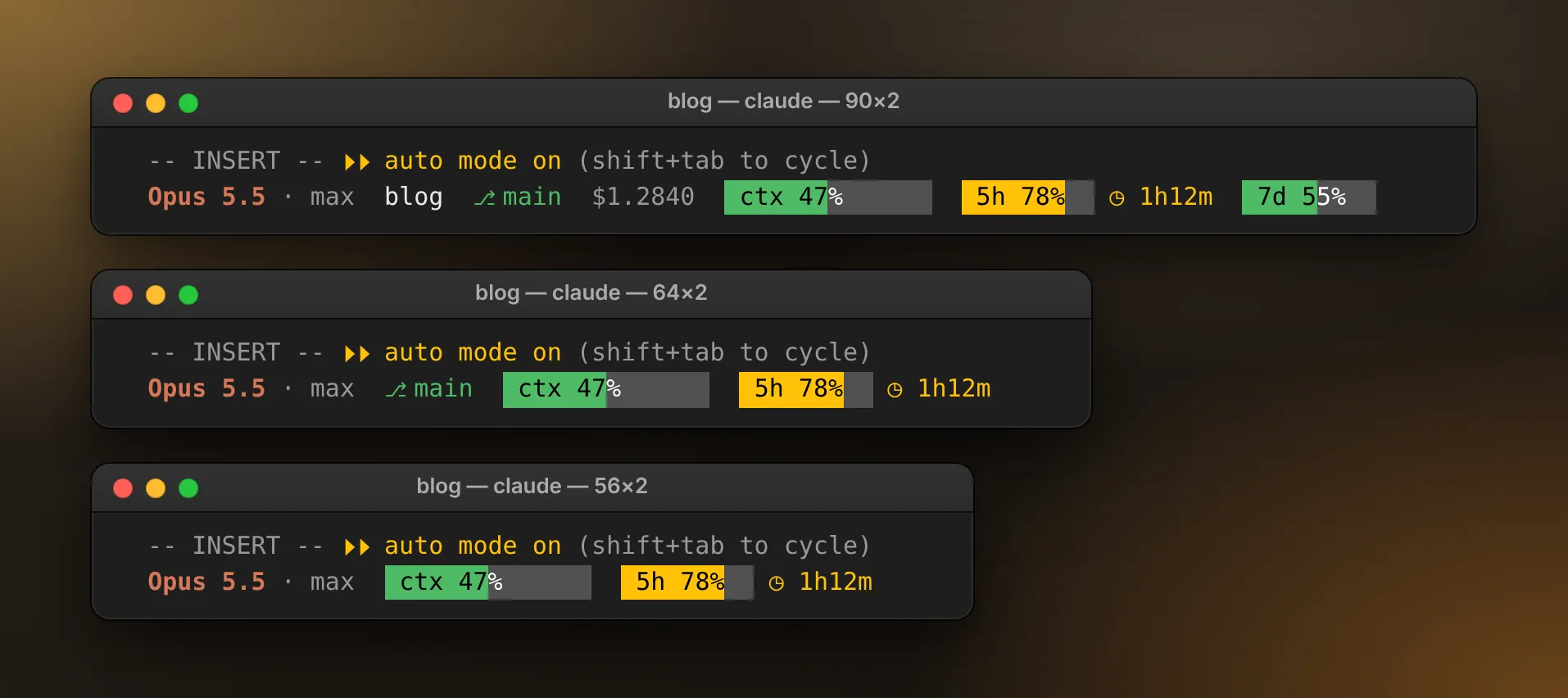
e.viewport.columns says how wide the terminal is, and the footer keeps two cells free at each end, so the line gets four fewer. When it doesn’t fit, segments go in a fixed order: the cost, the folder, the weekly gauge, the branch, the five-hour gauge. A gauge that’s amber or red goes only after all the quiet ones, and the model and the context gauge never go. If even that’s too wide, wrap="truncate" cuts the line short rather than wrapping it onto a second row.
Width is counted in cells, not characters. A Japanese folder name takes two cells per character, as do most emoji, and an accent that combines with the letter before it takes none.
Refreshing without piling up
A refresh waits on the usage figures and on git, and events keep arriving meanwhile. So the mod runs one refresh at a time: a request that lands mid-refresh marks the line dirty, and the refresh goes round once more when it’s done:
let isRefreshing = false
let isDirty = false

function kick($: EngineInterface): void {
  if (isRefreshing) {
    isDirty = true
    return
  }
  isRefreshing = true
  void drain($)
}

async function drain($: EngineInterface): Promise<void> {
  try {
    do {
      isDirty = false
      try {
        await refresh($)
      } catch (error) {
        $.ui.log(`my-statusline: ${String(error)}`, { to: "debug" })
      }
    } while (isDirty)
  } finally {
    isRefreshing = false
  }
}
These kick a refresh:
session.start, when the session begins and after every reloadsession.measure, after each turn and whenever a plan limit movesturn.complete, for the main conversation only (a subagent’s turns carry anagentId)classic.PostModelSwitch, after/modelclassic.SessionStart, after/clear,/compactand a resume- a ten-second
$.clock.everytimer, for what changes outside any turn, like checking out a branch in another terminal
The classic. ones are settings hook events: every event a settings hook can handle reaches mods too, under classic. and its name, with the same JSON.
A refresh writes to $.state only when something changed. Every write redraws the line, and an idle session has no reason to redraw every ten seconds.
State that survives a reload
The starter keeps its text in a module variable, which every reload starts over. Mine keeps a snapshot in $.state, Claude Code’s per-session store for mods. It’s reactive (a ui.render hook that reads a value redraws when the value changes, no $.ui.invalidate needed), and it survives a reload.
$.state needs a declaration, so claude plugin validate can check every read and write:
export type Snapshot = { model: string; context: number | null }

declare module "claude-code" {
  interface PluginState {
    "my-statusline": { snapshot: Shaped<Snapshot | null> }
  }
}
plugin.json names the file with "types": "./types/index.d.ts", and the module defines the value once, at the top:
const snapshot = atom({ plugin: "my-statusline", key: "snapshot" }, null, {
  shape: "v1",
})
read($, snapshot) and update($, snapshot, fn) do the rest. The shape comes up again below.
What tripped me up
Drawing
$.ui.status isn’t a status line. The call exists, and it draws ⚠ my-statusline: … in the warning colour: a mod’s message, not a status line. A status line belongs in the hint line.
Tests can’t see the screen. $.ui.mount checks that a tree is valid but never paints it, so only a real terminal shows you that the line sits under the hint row.
Your font decides your symbols. My first reset marker was ↻. MonoLisa, my font everywhere, lacks it, as do Cascadia Mono and Consolas, so the terminal borrowed it from another font and drew it small. ◷ is in MonoLisa and Cascadia Mono; the branch’s ⎇ is in MonoLisa only. Check a font’s character map before you pick a symbol.
Reading the session
The model is an id. $.session.model() returns claude-opus-5-5, sometimes with [1m] on the end, never “Opus 5.5”. The script got a display name for free; the mod makes its own, without mistaking the date in claude-haiku-4-5-20251001 for a minor version.
No reading isn’t zero. context.percent is missing until the first reply and again right after a compaction: show --, and keep a real 0% looking like a number. The limits are empty until the first reply too, stay empty unless you’re on a Pro or Max plan, and drop out once their reset time passes.
Money has float noise. The cost arrives as a float, and 0.037765400000000005 is a real value. Format it before you show it; mine uses four decimals.
There’s no effort call. The status line JSON carries the live effort level; the mods API has nothing like it. So the mod shows the level the session started with (CLAUDE_CODE_EFFORT_LEVEL, or else the effortLevel setting) until a turn ends, then the level that turn actually ran at, which classic.Stop reports as effort.level. A /effort change shows after the next reply. Ultracode, a toggle, only appears as a reminder Claude Code adds to the conversation, so the mod watches for it in a session.append hook, which works until a release renames the reminder.
Some things change after your hook returns. /clear resets the cost and the folder only after the session.end hooks return, so the mod refreshes half a second later.
State and reloads
/clear and a reload forget different things. /clear and /resume empty every mod’s $.state but keep the module loaded, so module variables survive. A hot reload is the opposite: $.state survives, module variables and timers don’t. So compare against what $.state holds, never against what you remember writing, or the line stays blank after /clear. And start timers in session.start, which runs again after every reload.
session.start doesn’t run after /clear. classic.SessionStart does, after /clear, /compact and a resume, so hook both.
Change the type, change the shape. A reload runs new code against the old $.state, so a snapshot whose type has changed gets read in the wrong shape. Bump the atom’s shape from 'v1' to 'v2' when the type changes, and the new code reads an older snapshot as absent.
The validator’s rules
claude plugin validate reads your source to work out what the mod does, so it insists on calls it can read:
- Pass
$only to functions declared at the top level of the module. - Call it as
$.noun.method(…): noconst ui = $.ui, no destructuring, no$.ui?.toast(…). - Name environment variables in
$.env.getwith string literals. - No dynamic
import().
Limits and setup
Ten seconds, then you’re skipped. A hook’s own code gets ten seconds per event; waiting on $ calls doesn’t count. Don’t await slow work in a hook: start it, return, and let it redraw when it’s done.
git varies. git branch --show-current needs git 2.22; git symbolic-ref -q HEAD works on any version. Give it a timeout, and if it hangs or isn’t installed, keep the last branch it named. $.process.run takes a list of arguments, uses no shell, and took about 65 ms a call on my machine.
Two status lines. Forget to delete the old statusLine and both show. Mine checks the settings when a session starts and shows a toast if one’s still there.
Trust first. Mods wait for a folder’s trust prompt, so in a folder Claude Code hasn’t opened before, the line appears once you accept it. --bare and --safe-mode start a session without them.
Generated files. Each load writes type declarations for your exact Claude Code version into .claude-plugin/types/, plus a tsconfig.json at the mod’s root, so your editor can autocomplete and type-check. Keep them out of git; every load rewrites them.
On Windows, separate plugin folders with ;, and keep the mod’s path short: claude plugin test fails once it passes about 258 characters.
Testing it
claude plugin test runs every *.test.ts and *.test.tsx file in a mod. There’s no session, no sign-in and no network: the test stands in for Claude Code and answers every call the mod makes. This is a test for the starter:
import { expect, mock, test } from "claude-code/testing"

const HINT_ROW = { type: "engine", ref: 0 } as const

test("draws the line and carries the hint row", async ($, on) => {
  // Claude Code's side, stubbed: no session, no model, no network.
  const clock = mock.clock(on)
  on("session.model", () => ({ value: "claude-opus-5-5" }))
  on("session.usage", () => ({
    value: {
      startedAt: 0,
      context: { window: 200_000, tokens: 24_000, percent: 12 },
      rateLimits: [],
      cost: { usd: 0 },
    },
  }))
  on("session.start", ($, e) => ({ cwd: e.cwd }))
  on("ui.render", { component: "PromptHint" }, () => HINT_ROW)

  await $.session.start({
    cwd: "/work",
    surface: "terminal",
    isInteractive: true,
  })
  await clock.settle()
  const ui = await $.ui.mount({
    plugin: "my-statusline",
    surface: "terminal",
    component: "PromptHint",
    props: { isDraft: false, isWorking: false, hint: "? for shortcuts" },
    viewport: { columns: 120, rows: 40 },
  })

  expect(await ui.drawn()).toMatchObject({
    type: "Box",
    children: [
      { type: "Text", children: ["claude-opus-5-5  ctx 12%"] },
      HINT_ROW,
    ],
  })
})
mock.clock hands the mod a clock the test controls, and clock.settle() runs the work a hook started without waiting for it. Each stub answers one of the mod’s calls with { value }. $.ui.mount draws the site once, and drawn() returns the tree.
Types catch the rest. Once Claude Code has loaded the mod, the tsconfig.json it wrote lets your editor, or tsc -p ~/.claude/mods/my-statusline from a TypeScript install, check the mod and its tests against your version’s types in strict mode. Misspell a call as $.session.modle() and it answers Did you mean 'model'?.
Break it on purpose. Delete {hintRow} from register.tsx and this test fails, which is the point. A test that checks for an absence, like “no git call outside a terminal”, passes against a mod that does nothing at all, so break the code once and watch the test go red before you trust it. Mine has 91 tests and runs them in about two seconds.
One more check needs no model at all: start Claude Code headless, let it load the mod, and quit.
claude -p --no-session-persistence --plugin-dir ~/.claude/mods/my-statusline \
  --debug-file mod.log "/exit"
grep "hooks module my-statusline@inline loaded" mod.log
Switching over
- Put the mod in a folder of its own, such as
~/.claude/mods/my-statusline. - Add
CLAUDE_CODE_PLUGIN_DIRSto theenvblock of~/.claude/settings.json. - Delete the
statusLineentry, the script it ran, and any permission rule that allowed the script. - Run
claude plugin validateon the folder, then start a new session.
With jq, steps 2 and 3 in one go, keeping a backup:
cp ~/.claude/settings.json ~/.claude/settings.json.bak
jq '.env.CLAUDE_CODE_PLUGIN_DIRS = "~/.claude/mods/my-statusline" | del(.statusLine)' \
  ~/.claude/settings.json.bak > ~/.claude/settings.json
That overwrites any plugin folders you already list, so add to them instead if you have some. In a session, /plugin confirms the mod loaded: a dim line under its tabs reads 1 mod active · my-statusline. If the line doesn’t appear, start claude --debug-file mod.log and look in mod.log for hooks module my-statusline@inline loaded. To go back, delete the env line and restore your statusLine from the backup.
Should you switch?
If your status line is text and you like it, keep the script. Reach for a mod when you want the line to look and behave like part of Claude Code.
Mine was built on Claude Code 2.1.288 and its tests still pass on 2.1.293, but the mods API is young. After every update, run claude plugin validate and the tests before you trust the line.